Drupal is built for sites that have to hold a lot: many kinds of content, several languages and editors with different permissions. We plan the structure first, then build a site your editors find easy to use.
We find out who writes what on your current site and who has to approve it. Then we set up the editing screens around those tasks, so each role gets the forms and buttons it needs.
How a Drupal site fits together
A Drupal site has more moving parts than a WordPress one. They are what let it serve many teams and languages, and what make it cost more to build.
| Part | What it does |
|---|---|
| Drupal core | Content types, fields, users, roles, languages, revisions and Views, the tool that builds lists and pages from your content. |
| Contributed modules | Free add-ons from drupal.org for forms, search, SEO and security. Each one is a separate project with its own maintainers. |
| Custom modules | Code written for your site, such as an import from another system, a dashboard or a single sign-on bridge. |
| The theme | How the public site looks, written in Twig templates. Editors work in a separate admin theme. |
| Configuration | Settings, from fields to permissions, exported to files and moved from the test site to the live one with the code. |
| Hosting | A database, Composer to manage the code and, on busy sites, Redis for caching. |
Day to day, editors fill in forms made for each kind of content and build pages from ready-made sections: a text, a gallery, a map, a form.
For those sections we use Paragraphs, a widely used way to build pages on Drupal sites, so editors pick from parts designed for the site instead of laying pages out by hand. Drupal also has Layout Builder in core.
Changes are built and tested on a copy first. Because Drupal exports its settings to files, a new field or permission reaches the live site together with the code, so nobody has to click through the admin twice and hope they matched.
The content model comes first
Events, for example, can get a content type of their own, with fields such as a date and the department that runs them. Enter an event once, and Views, part of core, lists it on the events page and on the department’s page without anyone copying it.
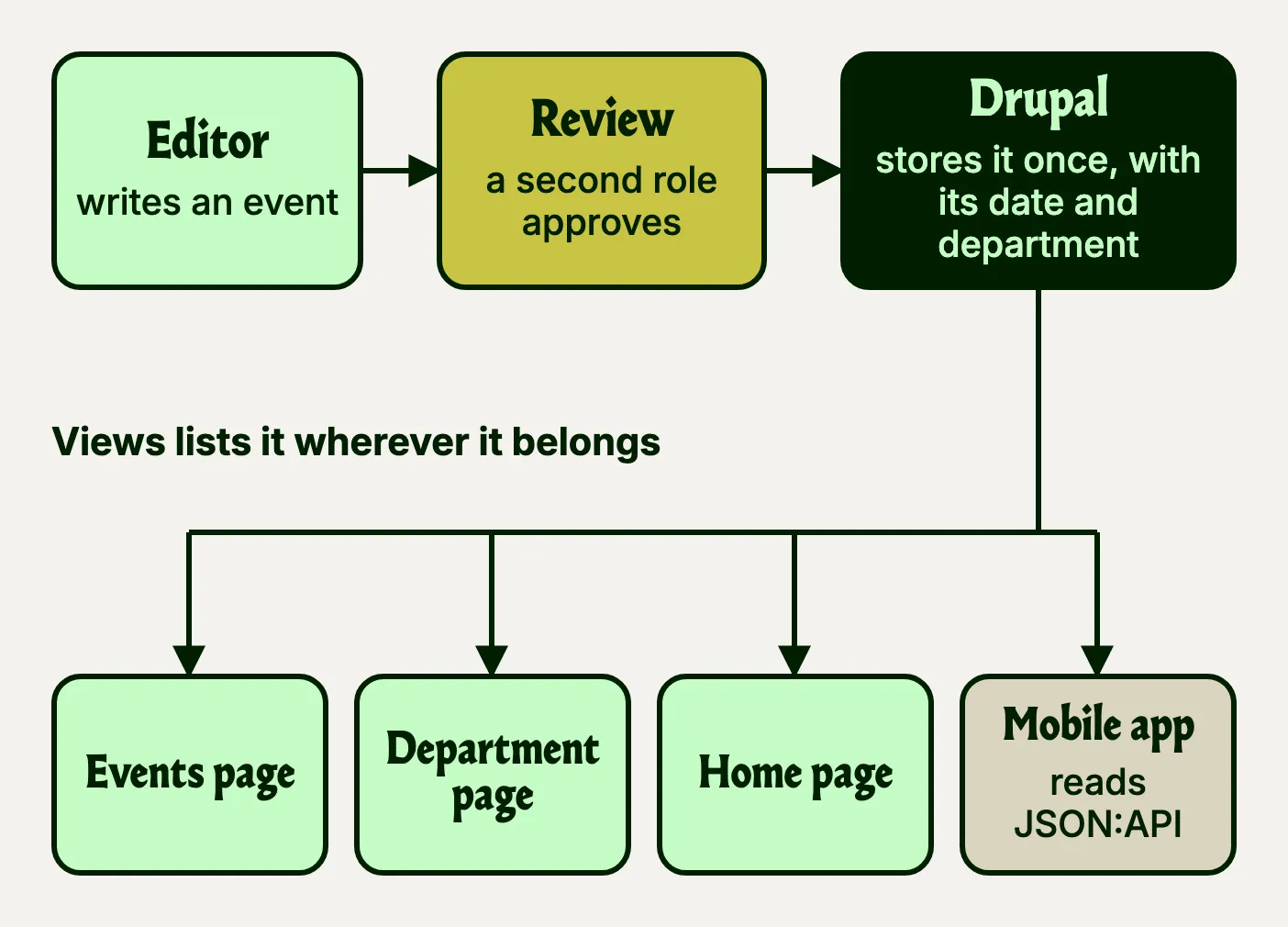
Drupal tags each cached page with the content it shows. When the event changes, every page showing it leaves the cache at once, so nobody sees the old date on one page and the new one on another.
The same event can reach other systems as data. JSON:API, part of Drupal core since version 8.7 in 2019, serves your content types in a standard format once it is switched on, so a mobile app or another of your systems can read them without custom code.
So every Drupal project starts with a content model: the content types, their fields and how they connect, agreed with your team before any design. It is the cheapest moment to get the structure right.
Many owners, one site
Each role gets its own permissions for each kind of content. With content moderation switched on, a page goes from draft to review to published, and only the roles you choose can publish. Every edit is saved as a revision, and any earlier version can be restored.
Drupal can also prepare a bigger change, such as a new section of twenty pages, in a workspace and publish it in one go.
Translation is part of Drupal core, in four modules: one adds languages, and the other three translate the interface, the content and the settings.
Why governments build on Drupal
Not every government site is on Drupal, but several governments build their shared platforms on it.
Part of the reason is cost and control. Drupal is free under the GPL, with no licence to renew, and any Drupal team can take a site over, which leaves the next public tender open to all of them. One Drupal codebase can also run many sites, each with its own content, editors and address, and one round of updates covers them all.
The rest is predictability. Drupal’s Security Team releases core fixes on one Wednesday a month, usually the third, between 16:00 and 22:00 UTC, so an IT department can book the time. Only a highly critical hole that is already being exploited may be fixed outside that window.
Core aims for WCAG 2.2 AA, and we check the rest
The theme and the content decide the rest, so accessibility is checked on every page we build.
Pros and cons of Drupal
Pros
- Roles, review steps, revisions and translation, all in core
- Enter an event once and Views lists it on every page that needs it
- Major upgrades have been updates, not rebuilds
- A Security Team that warns before critical fixes come out
Cons
- Costs more to build than WordPress, the better pick for one team
- Fewer developers to choose from
- Contributed modules get security cover only if their maintainers opt in
| Your project | Our pick |
|---|---|
| Many teams, sign-off steps and languages | Drupal |
| A department or project site run by one team | WordPress, simpler to run |
| An online shop | Shopify, which runs the hosting and card payments for you |
| A booking system or portal with rules of its own | Laravel |
From content model to launch, in six steps
A Drupal site for many teams takes longer, mostly because of the planning and the content move.
Content model and roles
We sit down with the people who write, approve and publish. Out of that come the content types, fields, roles and, where you need them, review steps.
Design and sections
Page templates and the section types editors combine, designed and checked for accessibility.
Build on a copy
Modules, theme and custom code on a development site, with the configuration in version control. Every change runs a dependency audit, a secret scan and a security scan, and only a person can start a release to the live site.
Migrate and rehearse
Content comes across from the old site with Drupal’s Migrate tools. We rehearse on a copy and check the results before the final run.
Train and launch
Before launch we show your team how it all works, every old address redirects to its new one, and the site goes live.
Look after it
Security updates on a website maintenance plan, and each major Drupal upgrade planned ahead.
Modules we rely on, and how we pick them
These are the contributed modules we use, grouped by the job they do.
| Job | What we use |
|---|---|
| Editing | Gin and Paragraphs for building pages from ready-made sections |
| Forms | Webform, with its own submissions, access rules and exports |
| Search engines | Metatag for titles and descriptions, Pathauto for readable addresses, Redirect for old ones and Simple XML Sitemap |
| Search on the site | Search API |
| Security | Two-factor login (TFA), Password Policy, Admin Audit Trail, Honeypot against spam, Security Kit and ClamAV to scan uploads |
| Single sign-on | OpenID Connect or SAML Auth, so staff log in with the accounts they already have |
| Deployments and speed | Config Split for settings that differ between test and live, and Redis for caching |
| Moving content | Migrate Plus and Migrate Tools |
| Cookies | Klaro, which asks before analytics run |
| Development | Composer for the code, Drush on the command line, DDEV for local copies and GitLab CI for the checks |
We prefer modules with a stable release that the Security Team covers.
What to do with the Drupal site you have
| Your site runs | What to do |
|---|---|
| Drupal 7 | Build a new site: on Drupal 11 if you still need its roles, review steps and languages, on WordPress if you don’t. |
| Drupal 8 or 9 | Update to Drupal 11 one major version at a time. Versions can’t be skipped. |
| Drupal 10 | Update to Drupal 11 now. |
| Drupal 11 | Keep it current. |
Questions we hear
Can you upgrade our old Drupal site?
Yes. From Drupal 8 onwards, moving up a version is an update rather than a rebuild, and your content and URLs stay as they are. From Drupal 7 it is a move to a new site: on Drupal 11, or on WordPress if the site no longer needs what Drupal does. Either way we plan the move first and clear out what you no longer need.
Is Drupal harder for editors than WordPress?
Out of the box, it can be. We set up the editing screens around your team’s tasks, so each editor gets plain forms for their kind of content and only the buttons their role allows. Text is written in CKEditor 5, which works much like a word processor.
Can Drupal use our single sign-on?
Yes. With single sign-on through OpenID Connect or SAML, staff log in with the accounts your organisation already runs, and nobody keeps a separate Drupal password. When someone leaves, closing their main account stops them signing in here too.
Is Drupal more expensive than WordPress?
Usually, yes, to build. The cost grows with the number of content types, roles and languages, how much content moves across and how many systems the site connects to, and fewer developers work with Drupal than with WordPress. To run, it needs Composer and regular updates, which our maintenance plan covers.
Is Drupal secure?
Drupal’s core is looked after by its Security Team, which publishes fixes and warns in advance when a critical one is coming. Add-on modules are covered only when their maintainers opt in, which is why we check each one before it goes in. We run core and module updates on a maintenance plan, with monitoring and backups. We look after your website’s security to reduce the risk of hacking and data leaks.
Is Drupal still worth choosing?
For a site with many editors, several languages and sign-off steps, yes: roles, review steps and translation come with core, and the Security Team announces critical fixes in advance. For a site one team runs, WordPress costs less.