Shopify handles hosting, checkout and card payments, which suits a team that would rather sell than look after a website. We design the store your customers see and set up the Latvian bank links and parcel lockers it needs.
We start by sitting down with your team to go through what you sell and how it reaches your customers. Then we shape the store’s web design around your products, adapting a bought theme or building your own, and add apps only where they earn their place. Before launch your team gets a written checklist of the admin settings that are theirs to run.
How a Shopify store fits together
Shopify is rented software. You pay for a plan, and Shopify runs the servers, the checkout and the security. Your store is built from five parts on top of that.
| Part | What it does |
|---|---|
| The admin | Products, stock, orders, customers and discounts. Your team works here every day, on a computer or in the Shopify app. |
| The theme | How the store looks: home, collection, product and cart pages, built from sections your team can rearrange in the theme editor. |
| Apps | Extra features from the App Store, such as reviews, email marketing, translations and parcel lockers. |
| The checkout | Shopify’s own, shared by every store. Every plan can brand it. |
| Markets | The languages, currencies and prices for each country you sell to. |
Day to day, your team adds a product with its photos, variants and price, and collections set up with rules pick it up by themselves. An order arrives with the parcel locker, or the locker brand, the customer chose, and the shipping label is a few clicks away. Staff accounts decide who sees what, so whoever packs the orders doesn’t need to see your sales reports.
What Shopify covers in Latvia, and what takes an app
| Your store needs | How it works on Shopify |
|---|---|
| Cards, Apple Pay and Google Pay | Shopify Payments |
| Swedbank, SEB, Citadele and Luminor bank links | Apps from Montonio or MakeCommerce, one per bank |
| Omniva, DPD, Venipak and Latvijas Pasts lockers | A shipping app, such as Swotzy or Parcely, so the customer chooses a locker, or a locker brand, before paying |
| Latvian, English and Russian pages | Translated with Translate & Adapt or an app such as Langify |
| VAT for each EU country | Shopify calculates it; your accountant still files the returns |
Pros and cons of Shopify
Pros
- Hosting, security and updates are Shopify’s job, not yours
- Cards, Apple Pay and Google Pay through Shopify Payments
- An admin built for running a shop, with a phone app for orders
- Apps for most Baltic needs, such as bank links and parcel lockers
Cons
- Apps add up
- Fixed addresses: /products/ and /collections/ can’t be changed
- Your theme runs only on Shopify; for code you own outright, look at WordPress
| Your project | Our pick |
|---|---|
| A content site with a shop on the side | WordPress with WooCommerce |
| A shop you want to own outright and host anywhere | WordPress with WooCommerce |
| Quotes, made-to-measure products or pricing rules of your own | Laravel |
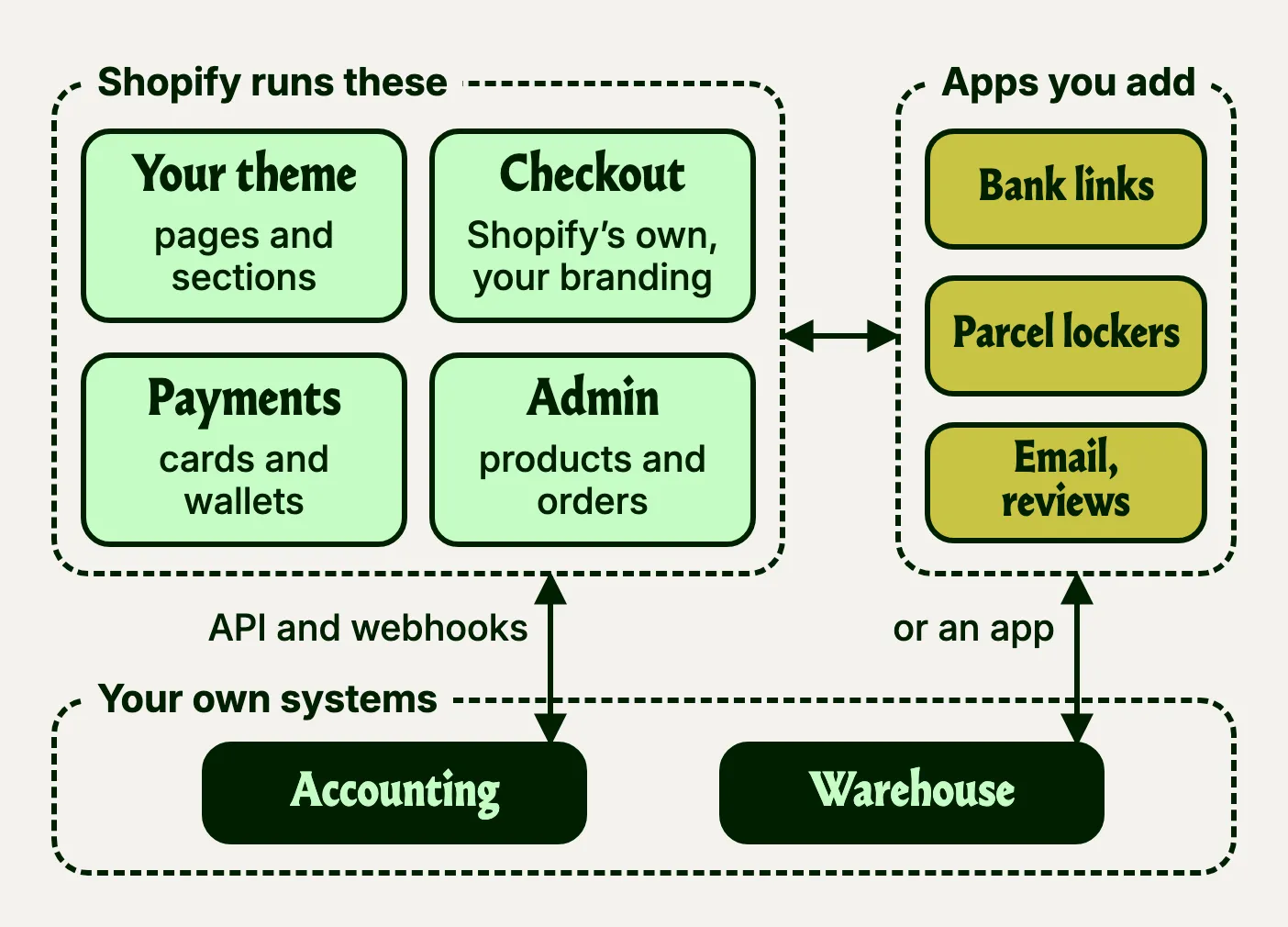
What Shopify runs, and what plugs into it
Nobody outside Shopify, us included, can change the code its stores run on. What we write is the theme: templates in Liquid, Shopify’s own template language, and the sections your team rearranges in the theme editor.
Because Shopify runs the servers, it also carries the load on your busiest day. Over Black Friday and Cyber Monday 2025, stores on Shopify sold $14.6 billion between them, 27% more than a year before.
- in sales a minute at the peak, on Black Friday
- $5.1m
- shoppers bought from stores on Shopify that weekend
- 81m
- requests a minute reached Shopify’s network at the peak
- 489m
- Shopify’s own figures, not audited
An app usually runs on its developer’s own servers and works inside your store through Shopify’s API. It can add a block to the theme, a screen to the admin and, where your plan allows, content to the checkout.
Your own systems connect the same way. Webhooks tell your accounting or warehouse system the moment an order is paid, and through Shopify’s GraphQL Admin API those systems send back stock levels and tracking numbers.
Routine admin jobs don’t always need a paid app or our code. Shopify Flow, Shopify’s own free app on Basic, Grow, Advanced and Plus, runs rules you set up in the admin, such as tagging every order over €500 or emailing the warehouse when stock runs low.
A store can also sell through a front end of its own. Shopify’s Storefront API gives a separate website or app the products and the cart, and the customer still pays in Shopify’s checkout.
From your product list to the first real order
Before work starts, you know the scope, timeline and price.
Step 1
Your catalogue first
We go through your products and their variants with you, and settle how customers will pay and get their parcels before anyone designs a page.
Step 2
Theme and design
We choose between adapting a bought theme and designing your own, then design the product and cart pages first.
Step 3
Build and import
We build the theme unpublished, where customers can’t see it, and set up the apps. Then your products, customers and past orders come across from the old shop.
Step 4
Test orders and launch
Test orders go through every way to pay and deliver, then we launch from a written runbook that includes the way back if anything goes wrong.
Step 5
Watch and improve
We watch the checkout funnel and the average order value, and try changes such as a free-delivery threshold on a copy of the theme first.
Every theme change after launch is built on a copy of the live theme and checked on a computer and a phone before it goes live.
For a new shop, a bought theme is the right start, because a few months of real orders show what is worth building.
The catch is its updates: changes made in its code don’t carry over to the developer’s new versions by themselves, so an adapted theme can fall behind. A custom theme pays off when your products need something bought themes don’t do, such as a configurator or a size guide fed from your own measurements, or when the brand is the reason people buy.
Apps are where the monthly bill grows
Many apps are free to start and charge more as your shop grows, and most add code to your pages. So each one has to do a job the theme can’t. These are the apps we use.
| Job | What we use |
|---|---|
| Parcel lockers | Swotzy to put DPD lockers into the checkout |
| Languages | Langify and Translate & Adapt, which share the same translations |
| Klaviyo: welcome emails, abandoned carts, back-in-stock messages | |
| Reviews | Okendo |
| Forms | Shopify Forms, free, for sign-ups that go straight into your customer list |
| Cart | Amp Slide Cart, for a cart drawer that suggests add-ons and shows how far the customer is from free delivery |
| Cookies | A cookie consent app, alongside Shopify’s own banner |
An app is the right call when it runs a service: payments, delivery, email, reviews. Anything that only changes how a page looks, such as a size guide, usually belongs in the theme. You pay once to build it and nothing after that, and it loads only on the pages that use it.
Before an app goes on your store, we check
- What it costs each month in dollars, and what it takes per order
- Whether it adds code to every page, and how much slower the page gets
- Whether the theme could do the same job without it
- Whether its texts can be translated into Latvian
- What happens to your data, and to the theme, if it is uninstalled
A move to Shopify changes almost every address
On Shopify, product addresses always start with /products/ and collections with /collections/, and the word stays in English on your Latvian pages too. So almost every old address changes in a move. We move your products, customers and order history, redirect each old address to its new one and watch the numbers after launch, so a drop in search traffic shows up early.
Questions we hear
Should we use Shopify or WooCommerce?
Shopify, if the shop is the whole site. It runs the hosting and the checkout, so there’s less to look after. WooCommerce, if the shop sits inside a bigger content site, or if most customers pay by bank link.
Does Shopify work with Latvian banks?
Yes, through apps. Shopify Payments takes cards, Apple Pay and Google Pay in Latvia, but not bank links. Swedbank, SEB, Citadele and Luminor payments come through apps from Montonio, MakeCommerce, Klix or Paysera, and Shopify adds its own fee on those orders.
How do customers pick a parcel locker?
In the cart or in the checkout, depending on your plan. Swotzy can list the five nearest lockers as delivery options in the checkout, but that needs Shopify’s carrier-calculated shipping. On Basic, the customer picks a locker in the cart with Parcely, or chooses a brand and Swotzy assigns its nearest locker.
Can it connect to our accounting and stock?
Usually, yes. Many accounting and warehouse systems already have a Shopify app, and for the rest we build a small integration through Shopify’s API. Tell us which systems you use, and we’ll look at what exists for them before you decide anything.
If we leave Shopify, what do we keep?
Your data. Products, customers and orders export as spreadsheet files, but the product file only links to the images on Shopify’s servers, so keep your own copies. The theme’s code downloads too, but it only runs on Shopify.